

Recurring and Forecasted Transactions Widget
The Recurring and Forecasted Transactions feature is a widget that gives customers a clear, consolidated view of upcoming financial commitments. It highlights recurring transactions such as subscriptions, bills, and loan payments, alongside forecasted payments based on previous spending patterns. This helps users plan ahead, manage cash flow, and avoid unexpected expenses, supporting better budgeting.
This guide will walk you through how to use and navigate the Recurring and Forecasted Transactions feature effectively.
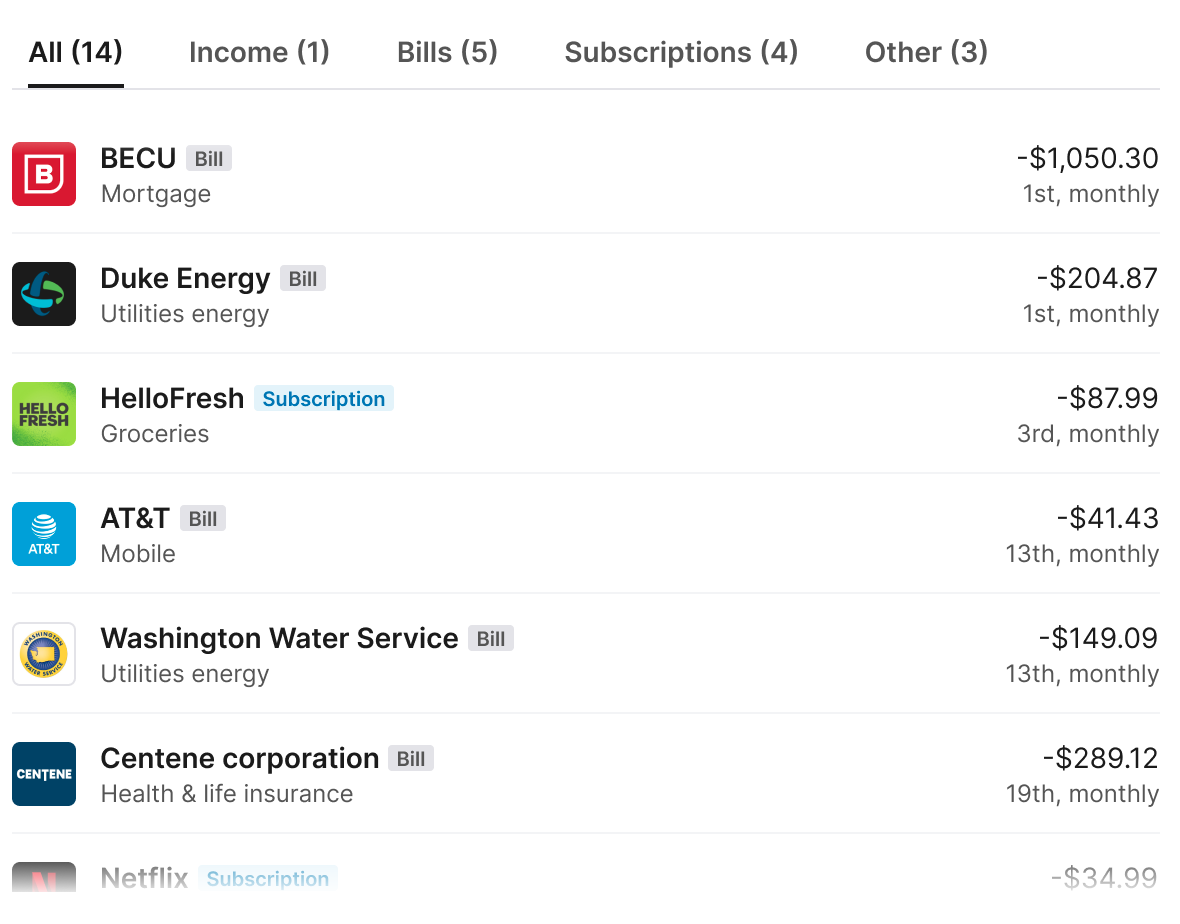
How to use the Recurring and Forecasted Transactions feature
Use the tabs at the top of the feature to switch between different transaction types:
- All: Displays a comprehensive list of all regular transactions.
- Income: Shows expected income, such as salary or other regular income related payments.
- Bills: Lists recurring bill payments such as utilities, rent, and mortgage payments.
- Subscriptions: Highlights ongoing subscription services, including streaming platforms or memberships.
- Other: Displays other regular transactions such as interest or transfers.
A full list of regular transactions is displayed under each type tab. The list is scrollable, allowing users to explore all regular payments or income entries within the selected tab.
Please note, the transaction and the associated category and amount shown within the widget relates to the latest transaction within the regularity group. Only transactions that are part of a group of regular transactions will be shown. For more information about transaction regularity please read our Transactions guide.
Customisation
The following customisations can be applied, by appending search parameters to the generated URL:
enable_accounts_filter- Enables account filtering by a list of the customers account
- For example
https://widgets.thisisbud.com/recurring-and-forecasted-transactions?token=an-example-token&enable_accounts_filter
enable_user_preferences_sync- Syncs account selection across widgets. The value you set controls whether the widget both sends and receives selections, or only receives them
- (no value) = Two-way sync. Selecting accounts in this widget updates every other widget that has the parameter. Selections made in those widgets also update this one
https://widgets.thisisbud.com/recurring-and-forecasted-transactions?token=an-example-token&enable_user_preferences_sync
receive_only= Sub-filters. Selections in other widgets filter the accounts shown here. Changes made within this widget are not sent to other widgetshttps://widgets.thisisbud.com/recurring-and-forecasted-transactions?token=an-example-token&enable_user_preferences_sync=receive_only- Use
receive_onlywhen this widget should follow the account selection made elsewhere, for example when your application has a global account filter and you want to sub-filter only on this widget
Updated 4 days ago